Microsoft Copilot

What is Microsoft Copilot?

Microsoft Copilot is an AI assistant integrated into Microsoft 365. This means you use it within the programs you already know and use daily, such as Word, Excel, PowerPoint, Outlook, and Teams.

You don’t need to learn any new software. Copilot is built into your existing work environment and helps you where you need it. By simply giving a command, Copilot can write texts, analyze data, or structure content. The goal is always the same: to help you work faster and more efficiently.

Working smarter with AI

Do you work daily in Word, Excel, Teams, PowerPoint, or Outlook? Then you know how much time is sometimes spent on writing, analyzing, and communicating. Writing emails and analyzing data are tasks that often take a lot of time and keep coming back.

Microsoft Copilot makes this process much simpler. Instead of figuring everything out and working it out yourself, you work together with AI. You give a command and Copilot helps you right away. You no longer need to switch between different tools or endlessly search for the right phrasing. The process becomes simple: you ask, you review, and you adjust where needed.

Microsoft Teams with Copilot

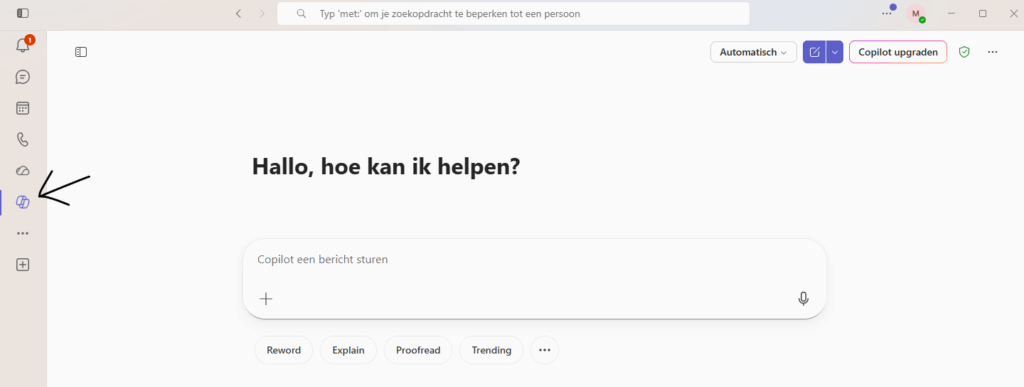
Meetings often take a lot of time. Taking minutes, looking things up, or remembering exactly what agreements were made. With Microsoft Teams you can make use of the Copilot option, which makes this much easier.

Copilot kan tijdens dat je aan het meeluisteren bent helpen. Copilot kan jou de ruimte geven om gewoon te focussen op wat er tijdens de vergadering wordt gezegd en kan voor je bijhouden wat er allemaal tijdens de vergadering wordt gezegd.

Copilot can help while you are listening in. Copilot can give you the space to just focus on what is being said during the meeting and can keep track of everything that is said during the meeting.

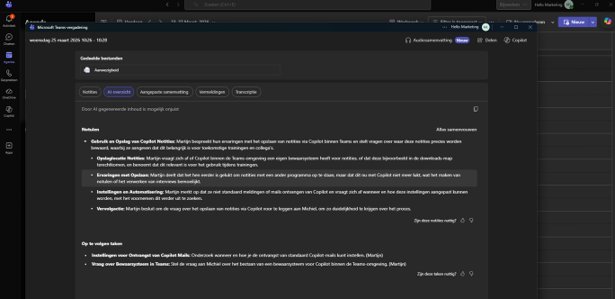
After a meeting you see a clear overview in Microsoft Teams of everything that was discussed. Copilot automatically creates minutes based on the conversation. Important points are neatly listed, so you can immediately see what was discussed.

Action points are also automatically collected. You see who needs to do what, without having to write this down yourself. This saves time and ensures nothing is forgotten. Also useful is that everything is linked to the transcript. You can always look back to see where something was said and by whom. This means you no longer have to endlessly search through recordings.

Copilot in Word

In Word, Copilot helps you write and improve texts. You can give a short command and Copilot immediately creates a first draft for you. This is handy if you don’t want to start with a blank page. You can also have existing texts summarized, rewritten, or adjusted in tone. Think for example of making a text more formal or writing something more accessibly.

Copilot in Powerpoint

In PowerPoint, Copilot helps you quickly set up a presentation. You give a topic and immediately receive a basic structure with content. You can also specify which style or colors you want to use, so that the presentation better matches your house style. Copilot then creates a draft that you only need to adjust or supplement.

Copilot in Excel

In Excel, Copilot is particularly strong in analyzing data. You can ask questions in plain language, such as what the main trends are or which products perform best. Copilot helps you create charts, pivot tables, and improve formulas. This means you need less knowledge of complex functions.

Copilot in Outlook

In Outlook, Copilot helps you deal with email more quickly. It can summarize long emails, suggest replies, and write new emails. You can also indicate in which tone you want to write, for example formal or somewhat more informal. This makes your messages more consistent and saves you time on daily communication.

Benefits of Microsoft Copilot

Microsoft Copilot offers various benefits that contribute to a more efficient and structured way of working. Because Copilot is integrated into Microsoft 365, it works within applications you already use daily, such as Word, Excel, Outlook, and Teams. This means you can get started right away without having to learn new systems.

An important benefit is the time savings on recurring tasks. Copilot helps with drafting emails, creating documents, and analyzing data by automatically generating a first proposal. You can then easily adjust this output, allowing you to reach a final result faster while maintaining control over the content and quality.

In addition, Copilot supports improving consistency and insight. It helps to structure information, formulate clear texts, and present data clearly. This not only increases speed but also the quality of the work. Copilot thus contributes to a more organized and productive workday.

Microsoft Copilot training

During this training you will learn how to effectively use Microsoft Copilot in your daily work. You will discover how to use Copilot for drafting emails, creating summaries of documents, and analyzing data in Excel. You will also learn how to quickly and easily prepare presentations in PowerPoint.

The training is practice-oriented and aligns with situations you encounter in your work. Using concrete examples, you will see how Copilot can support you with recurring tasks and how you can save time and work more efficiently. You will experience directly how you can more easily achieve a good result with the help of AI.

Attention will also be given to writing clear and effective prompts. You will learn how to give targeted instructions so that Copilot better aligns with your needs and delivers the desired result.

After the training you will know how to use Copilot independently and responsibly within Microsoft 365. You will be able to practically integrate AI into your daily work and use it to improve and speed up your work process.

Microsoft Copilot training banner

Get More Out of Your Workday with Copilot

With Microsoft Copilot you bring in a smart assistant that helps you work faster, more efficiently, and more consistently. From emails to presentations and from data analysis to meetings: Copilot supports you in every step of your work process.

The power lies in the simplicity Copilot makes a proposal, and you adjust where necessary. This way you stay in control while saving time.

Want to experience for yourself what Copilot can mean for your work? Start today and discover how easy working smarter can be.